Office mail used to be simple. Letters arrived, envelopes were opened, papers were stamped, and documents moved from desk to desk until someone handled them. That process worked when business moved slower and most teams sat in the same building. Now, offices deal with hybrid teams, remote approvals, compliance rules, high document volume, and faster customer expectations. Paper mail has not disappeared, but the old way of handling it has become too slow for modern operations.
That is why digital mailroom services are becoming more important for businesses that still receive physical mail but need faster access, cleaner routing, and better control. Instead of letting incoming mail sit in trays or depend on manual sorting, companies can convert mail into organized digital workflows from the moment it enters the business.
The Mailroom Problem Most Offices Still Have
Many offices still handle mail through manual steps that feel normal because they have existed for years. Someone receives the mail, opens envelopes, sorts documents by department, scans selected items, forwards attachments, and stores paper copies. The process may look harmless, but it creates delays that spread across the business.
A single invoice can sit unopened for a day. A customer form can land on the wrong desk. A contract notice can wait for someone who is out of office. A compliance letter can be scanned without proper naming or routing. These small issues create larger problems when volume increases.
Manual mail handling also creates poor visibility. Once a document leaves the mailroom, tracking its status becomes difficult. Teams may know that a document arrived, but they may not know who has it, whether it was reviewed, or where the final version was stored. That kind of uncertainty costs time and increases risk.
How a Digital Mailroom Works
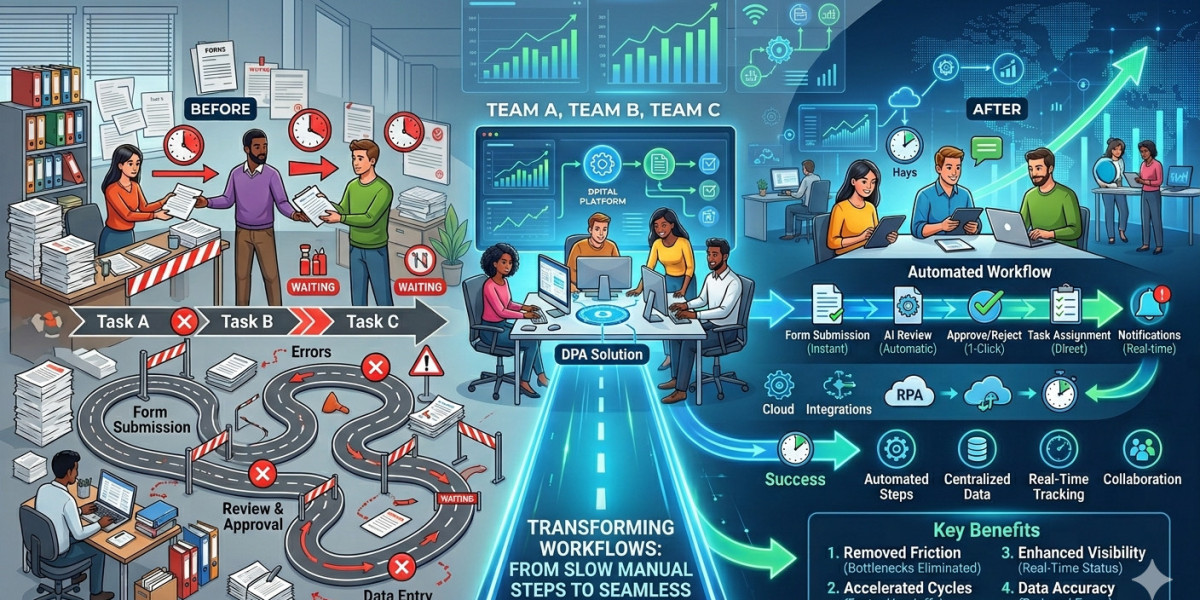
A digital mailroom converts incoming physical mail into structured digital information. Mail is received, opened according to agreed rules, scanned, classified, indexed, and routed to the right team or system. The goal is not just to create a scanned image. The goal is to make incoming documents usable as soon as possible.
A strong process usually includes document capture, data extraction, validation, workflow routing, secure storage, and archive-ready records. For example, an invoice can be scanned, identified as an accounts payable document, connected to vendor data, and sent to the right approval queue. A customer application can be routed to the service team with the required metadata attached. Legal notices can move directly to authorized reviewers instead of waiting in physical trays.
This changes mail from a passive pile of paper into active business information.
Why Offices Are Moving Away From Paper-Based Intake
Paper-based intake slows down work because it depends on location and manual attention. If the right employee is not in the office, the document waits. If the mailroom is busy, scanning gets delayed. If a file is misnamed or sent to the wrong person, the team loses time correcting the mistake.
Modern offices need information to move faster than paper can travel. Hybrid and remote teams especially need documents to be accessible without relying on someone physically walking mail across the office. A digital process gives employees access to incoming records from secure systems, not from a tray near reception.
This also supports better service. When customer documents, claims, forms or notices are processed faster, teams can respond sooner. The business looks more organized because it actually is more organized.
Better Control Over Incoming Documents
One of the strongest advantages of digital mailroom services is control. Incoming mail can be handled through defined rules instead of informal habits. Documents can be classified by type, department, urgency, customer, vendor, or business process.
This structure reduces the risk of lost documents. It also improves consistency. The same type of document can follow the same route every time. Invoices go to finance. HR forms go to HR. Legal notices go to legal. Customer documents go to the right service team. That sounds basic, but basic process discipline is exactly what many offices lose when mail volume grows.
Control also matters for sensitive documents. Businesses often receive mail that contains personal, financial, contractual, or regulated information. A digital mailroom can support permission-based access, audit trails, secure storage, and retention rules. That gives the organization better protection than leaving papers in open trays or shared office areas.
Faster Routing and Fewer Internal Delays
Routing is where many mailroom problems begin. A document may arrive on time, but the business loses time getting it to the right person. Digital workflows reduce that delay by sending documents based on rules and metadata.
If a supplier invoice arrives, the system can route it by vendor, purchase amount, department, or exception status. If a customer complaint arrives, it can go directly to the service team. If a signed agreement comes in, it can be sent to legal, sales operations, and archive storage without manual forwarding.
This reduces the need for employees to chase documents. It also helps managers see where work is waiting. If a department is consistently slow to review incoming documents, the delay becomes visible and easier to fix.
Stronger Support for Compliance and Audits
Mail often contains records that businesses need to keep. These may include contracts, claims, tax notices, medical documents, policy updates, loan files, legal correspondence, HR forms, or financial records. If these documents are handled casually, the business may struggle later when it needs proof, access history, or retention control.
A digital mailroom supports compliance by capturing documents early and applying structure from the start. Metadata, timestamps, routing history, and storage rules help create a cleaner record trail. This matters when auditors, legal teams, or regulators need to review how a document was received and managed.
The value is not only in storing the file. The value is in preserving context. A scanned document without context is just an image. A captured document with classification, routing, access control, and retention data becomes a stronger business record.
Better Experience for Employees and Customers
Employees do not want to spend time searching for missing papers, asking who received a document, or waiting for someone to scan mail. When incoming documents become digital early, teams can focus on the actual work instead of the handoff.
This also improves the customer experience. Customers may still send documents by mail, especially in finance, healthcare, insurance, government, legal, and enterprise environments. They expect the business to handle those documents quickly and accurately. A slow back-office process can make the whole company look slow.
A digital mailroom helps close that gap. It gives staff faster access to documents, reduces unnecessary follow-ups, and keeps work moving through a cleaner process.
What Businesses Should Look For
A good mailroom process should do more than scan paper. Basic scanning creates images. A proper digital intake process creates organized records that can move through the business.
Businesses should look for accurate document capture, reliable classification, metadata indexing, secure routing, integration with existing systems, and archive-ready storage. The process should also support exceptions because not every document fits neatly into one category.
Security should be part of the plan from the start. Access rights, encryption, audit logs, retention rules, and disposal controls help protect sensitive mail. For companies in regulated industries, these controls are not optional extras. They are part of responsible document management.
Why This Matters Now
The office has changed. Teams are no longer built around one building, one filing room, and one paper-based approval chain. Work moves across locations, systems, departments, and time zones. Mail handling needs to match that reality.
At the same time, businesses are under more pressure to reduce administrative waste. Manual mailroom tasks may not look expensive at first, but repeated sorting, scanning, forwarding, checking, and searching can consume large amounts of staff time. As document volume grows, old mail processes become harder to defend.
Digital intake gives businesses a more practical model. It helps teams manage physical mail without letting paper slow down digital operations.
Final Thoughts
Office mail is still part of business, but the old mailroom model no longer fits how modern teams work. Paper-based intake creates delays, hides document status, increases compliance risk, and forces employees to manage too many manual handoffs.
Digital mailroom services help businesses turn incoming mail into organized, secure, and searchable digital records. They improve routing, speed up response times, support compliance, and give teams better visibility from the moment mail enters the organization. For offices that still depend on physical mail but need faster operations, this shift is practical, timely, and hard to ignore.